
Inventory add-on
Know what you have, where it is, and who has it
Laptops, printers, delivery vans, forklifts, mowers. Keep track of all of it right in your helpdesk, so the ticket about a broken printer already knows which printer.
An add-on to any plan, from $29 a month. Free trials include it.

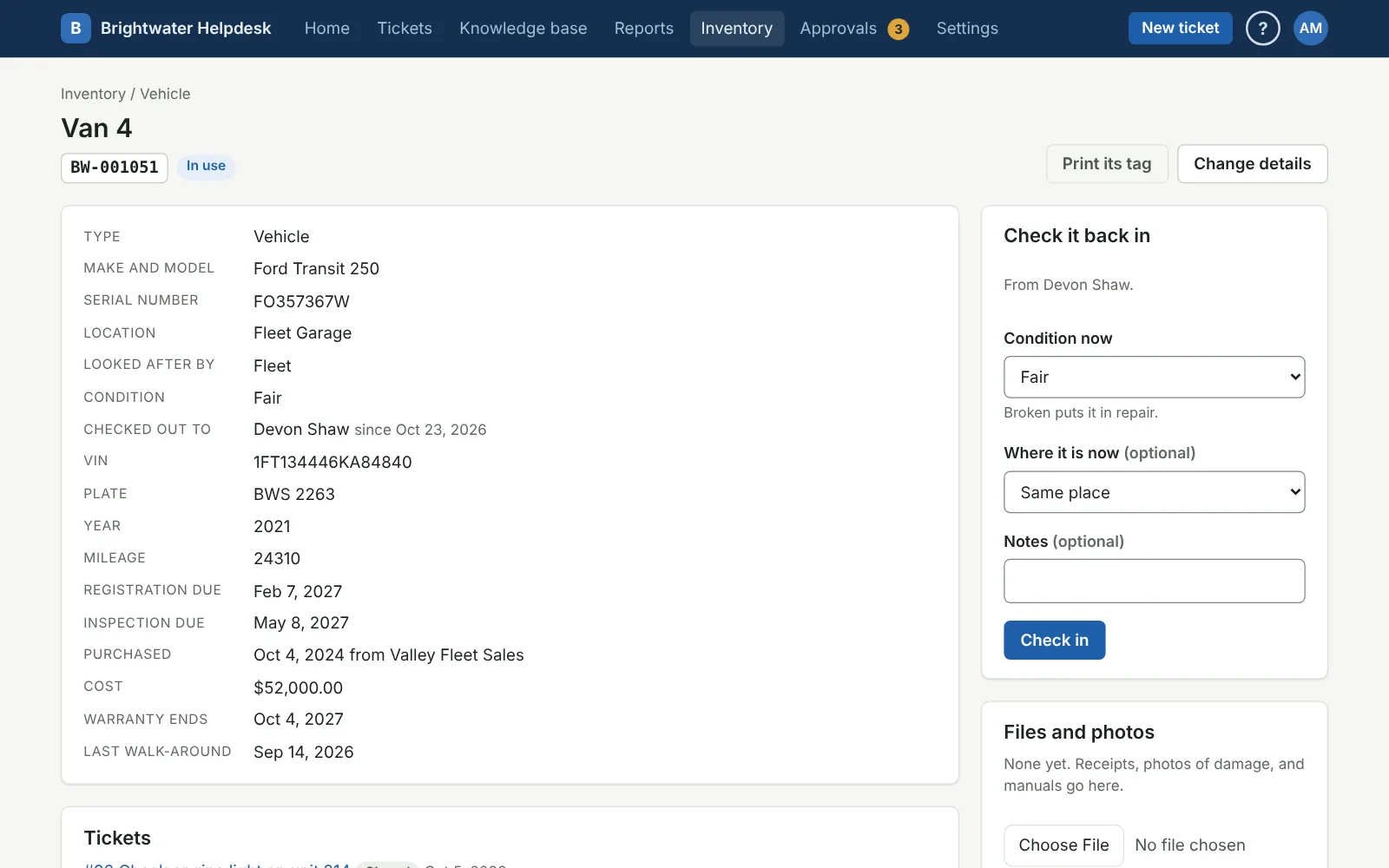
Every piece of equipment
Its whole story on one page
Each item has its own page: what it is, where it is, who has it, what it cost, when the warranty runs out, and every ticket about it.
- Your own types with your own fields, like a VIN, a plate, an hour meter, or an inspection date, plus eight ready-made types to start from
- Check it out to someone with a due date, see what’s overdue, and they get a reminder the morning it’s due back
- Everyone can see what’s checked out to them, under My equipment
- Receipts, photos of damage, and manuals kept with it
- Every change in its history, down to who moved it and when
- When it’s gone for good (sold, recycled, scrapped), a record of how it went and who OK’d it
Tags, tickets, and upkeep
Tag it and scan it
- Print your own tags with QR codes or barcodes, on label sheets or a label printer, or use the tags you already have
- Scan a tag with a phone’s camera, or a USB scanner, to pull it up
- Walk-arounds: go to a site, scan everything, and see what’s missing and what turned up somewhere it shouldn’t be
Tied to tickets
- People pick the broken thing right on the request form, from what’s checked out to them or at the location they pick
- Techs see the equipment on the ticket, one click from every past ticket about it
- Repeating upkeep tickets for each item, like an oil change every three months
Nothing slips by
- A heads-up before a warranty runs out, or any date you pick, like a registration or an inspection
- Reports by type, site, and department, with counts and what it all cost
- Bring your spreadsheet in, with a preview first and an undo after, and download it all any time
Found for you
Find what’s already out there
Nobody wants to type in 400 computers. The helpdesk can find them and line them up for you to add with a couple of clicks. Nothing in your inventory changes on its own, except that a found device is tied to an item when exactly one matches.
- Scan your network through the same small on-site agent used for Windows sign-in, or put it on any Windows PC that’s always on. It finds computers, printers, and switches, with the make, model, and serial number when the device shares them.
- Read your device lists from Microsoft Intune and Google Workspace (Chromebooks and phones), read-only
- An optional deep scan of your Windows PCs for the real serial number, memory, storage, processor, operating system, and who’s signed in
- Your Super Admins pick which address ranges get scanned, and only private network addresses can be

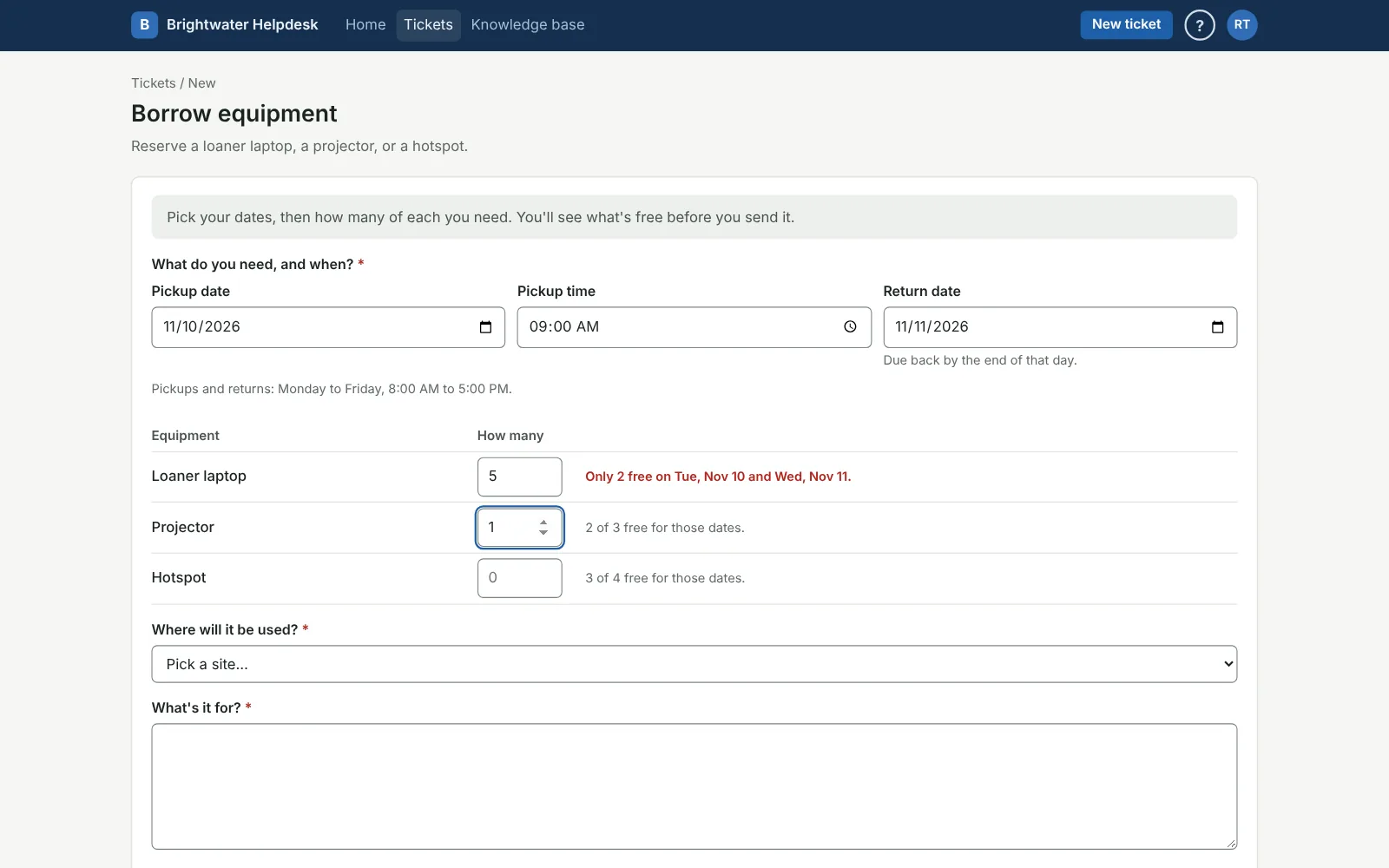
Reservations
Loaners, without the double booking
People reserve laptops, projectors, hotspots, or a van on a request form, and see what’s free for their dates before they send it. They can’t ask for the last projector twice.
- Put a Reserve equipment field on any request form: pickup day and time, return day, and how many of each
- You pick which pieces are in the loaner pool, so the laptop on someone’s desk never shows as free
- The ticket holds it until pickup, then your tech checks it out right from the ticket, due back the return day
- Today’s and tomorrow’s pickups and returns on one page, so things get charged and updated the day before
- A calendar of what’s free, and a flag on anything nobody came for
Each team looks after its own
Give the trucks to Vehicle Repair and the mowers to Grounds. Then only the people on that team who manage inventory can change them, while every tech can still look anything up. Or leave something with the whole department.
One flat price for your plan
It’s priced by your plan, not by how much you track, so add as much as you like. Government, schools, and nonprofits get the same 20% off on a yearly plan.
With Small
$29 a month
or $290 a year
With Team
$49 a month
or $490 a year
With Organization
$79 a month
or $790 a year
Questions people ask
Is it just for IT?
No. Anything with a tag works: vehicles, forklifts, radios, tools, furniture, keys. Make a type for it and add the fields you care about.
Do we need the on-site agent?
Only to scan your network. Everything else, Microsoft Intune and Google Workspace included, works without it. If you already use the agent for Windows sign-in, it can scan too, once it’s updated.
Can people reserve laptops and projectors?
Yes, it’s part of the add-on. Turn on reservations, pick which pieces people can borrow, and add a Reserve equipment field to a request form. They see what’s free for their dates before they send it, and the ticket holds it until pickup. Who can reserve is up to the form, like any other.
Who can change equipment?
People whose role has Manage inventory, for their own department or team, plus anyone who can change settings. Techs can look anything up, and everyone sees what’s checked out to them.
We already track it in a spreadsheet. Can we bring that over?
Yes. Import a CSV and you’ll see exactly what it will do before anything is saved. If it’s not right, undo it and try again.
Can we add it later, or drop it?
Add it any time. On a yearly plan you pay for the months left in your year, the same as adding techs. Dropping it takes effect at your next renewal.
Can we try it first?
Yes. It’s on in the demo (be the super admin to see it all), and free trials include it.
See it for yourself
The demo is a made-up company with three months of tickets. Pick who you’d like to be and click around. There’s nothing to sign up for.